FreeFull resolutionNo upload
Remove the background, keep every hair.
Clipout cuts out people, pets and products in full resolution with an AI model that runs on your own device. Nothing is uploaded, and there is no signup, watermark or daily limit.
- Your images never leave your device
- Up to 32 MP on a computer, 12 MP on a phone
- Transparent PNG, or any background you like
Drop images here
or paste with Ctrl+V. Up to 50 at once.
JPEG, PNG, WebP, HEIC and TIFF. Processed on this device.
Loading the AI model (115 MB)First visit: the 115 MB model downloads once, then it is cached on this device. You can drop images now.
How it works
Three steps, all in your browser
Drop your images
Drag in one photo or a whole batch, paste from the clipboard, or pick files. JPEG, PNG, WebP, HEIC and TIFF all work.
The AI cuts them out
BiRefNet finds the subject, then a full-resolution edge pass follows hair and fur and cleans the old background's colour out of the fringe.
Touch up and download
Erase or restore with a brush, pick a transparent, coloured, blurred or photo background, and save PNG, WebP or JPEG.
Want the details? Read the complete guide
Edge quality
Why the edges hold up
Most free removers stretch a small mask over your photo and leave a halo of the old background. Clipout adds two steps after the model.
Edges refined at full size
A guided filter redraws the mask along the real edges in your photo, so strands of hair stay sharp on a 12 MP image instead of turning soft.
Colour decontamination
See-through strands carry some of the old background's colour. Clipout estimates the true colour of the subject, so a cutout from a green wall has no green fringe on white.
Measured, not guessed
On 40 images from the AIM-500 matting benchmark, the refinement lowered alpha error (MSE) by 22% and edge gradient error by 31% against the same model's plain mask.
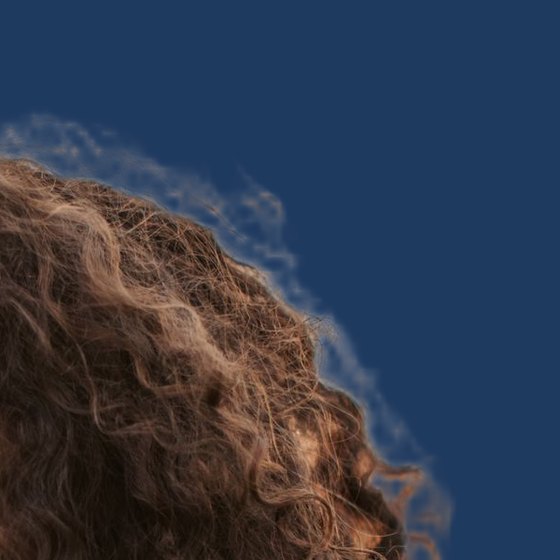
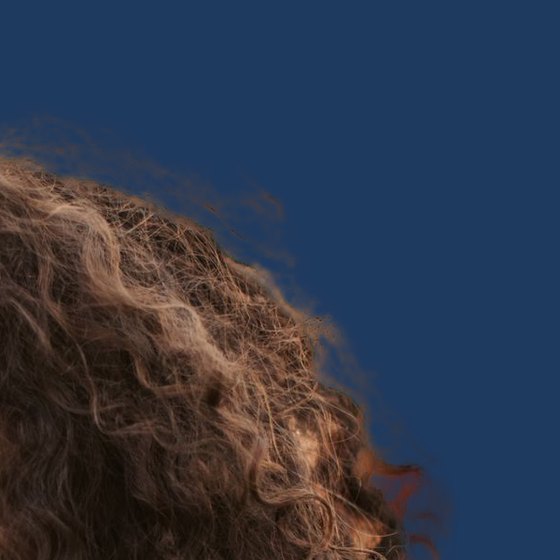
Hair detail from the portrait sample, cut out and placed on dark blue. Left: the model's mask stretched to full size. Right: after edge refinement and colour decontamination.
Features
Everything you need, nothing you don't
Private by design
The model runs in your browser. Your images are never uploaded, so there is nothing to leak, keep or delete.
Full resolution, free
Download the cutout at the size you dropped in, up to 32 MP. No credits and no preview-size catch.
Batch mode
Drop up to 50 images, let them run one after another, and download them all as one ZIP file.
Touch-up brush
Erase leftovers or bring back what the AI missed, with undo and redo.
Any background
Transparent, white for marketplaces, any colour, a blurred copy of the original, or a photo of your own.
Works offline
After the first visit the model stays cached. Install Clipout as an app and it works without a connection.
Compared
Clipout vs. upload-based removers
Checked on 16 September 2026 against the services' own help and pricing pages.
| Compared | Typical online remover | Clipout |
|---|---|---|
| Where your image goes | Uploaded to their servers | Stays on your device |
| Free download size | Often a small preview (remove.bg: 0.25 MP) | Full resolution, up to 32 MP |
| Account | Often required (Adobe Express, Canva) | Never |
| Daily limits | Common (Clipdrop: 20 a day for free) | None |
| Batch | Usually a paid feature | Up to 50 images, free |
| Offline | No | Yes, after the first visit |
| Speed | Fast on any device, needs a connection | Seconds with WebGPU, slower on older phones |
Questions
Is Clipout really free?
Yes. There are no credits, no paid tier and no watermark. The AI runs on your own device, so a cutout costs nothing to serve, which is why there are no limits.
Are my images uploaded?
No. The model and every processing step run inside your browser, and your images are never sent anywhere. You can check in your browser's network panel. The only other host the site talks to is a cookieless page-view counter, which you can switch off.
What resolution do I get?
The cutout is the same size as your image, up to 32 megapixels (8192 pixels on the longest side) on a computer and 12 megapixels on a phone. Larger images are scaled down to that size first.
Which AI model does Clipout use?
BiRefNet lite, an open model released under the MIT licence, run with ONNX Runtime Web: at 1024 pixels on WebGPU when your browser has it, and at 512 pixels on the CPU otherwise. After the model, Clipout refines the edges at full resolution with a guided filter and estimates the true foreground colour of see-through pixels.
How long does it take?
With WebGPU (current Chrome and Edge on a computer) a photo takes a few seconds. On the CPU engine, which iPhones and devices without WebGPU use, expect roughly 10 to 30 seconds. The first visit also downloads the model once (115 MB for the GPU engine, 94 MB for the CPU engine); after that it is cached.
Can I remove backgrounds from many images at once?
Yes. Drop up to 50 images; they are processed one after another, and Download all saves them as one ZIP file with the background and format you picked.
Does it work on iPhone and Android?
Yes, in Safari, Chrome and Firefox. iPhones and iPads use the CPU engine for reliability, so a cutout takes longer there than on a computer, and phone images are capped at 12 MP.
Which formats can I download?
PNG and WebP keep the transparency. JPEG has no transparency, so it gets the background you chose, or white.
Can I use the cutouts commercially?
Yes. Your images and the cutouts stay yours, the model is released under the permissive MIT licence, and Clipout adds no watermark.
Does it work offline?
Yes. After the first visit the page and the model are cached, and you can install Clipout from your browser's menu as an app.
Ready to cut something out?
Drop an image at the top of the page. It takes seconds, and it never leaves your device.
Remove a background